Add/remove child account in Encore

1 min. readlast update: 07.17.2026

How to Add or Remove a Child Account in Encore

Overview

This article provides instructions for linking a child account to a parent account, or unlinking a child account from a parent account within the Encore platform. This process is typically handled when updating customer billing structures or hierarchy relationships.

Procedure
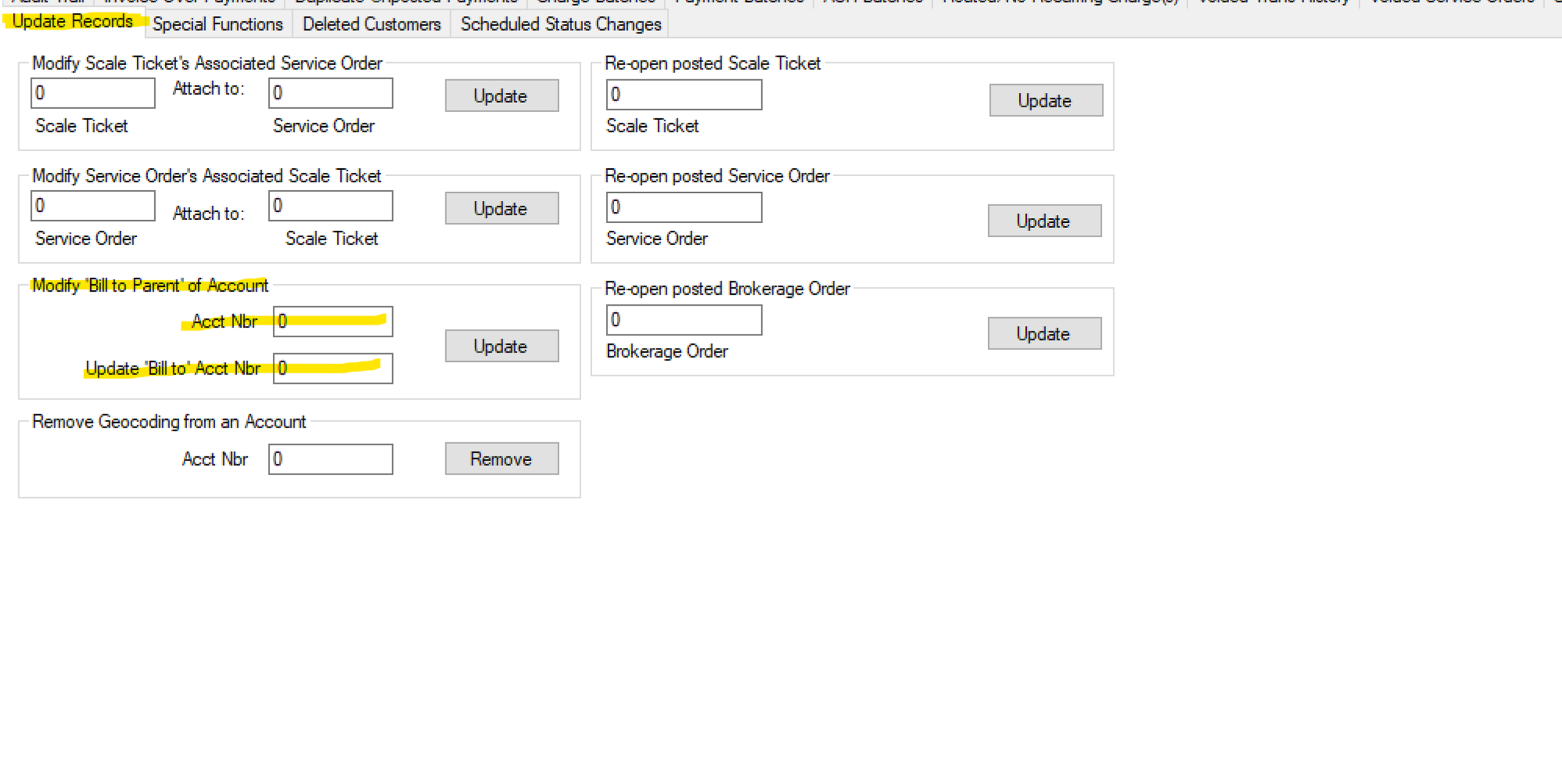
 

1.Navigate to Update Records:

Open Encore and use the top menu bar to navigate to:

Tools > Query > Update Records

2.Link a Child Account to a Parent:

To link a child account to a parent structure, enter the Parent Account Number into the "Acct Nbr" field under the Modify 'Bill to Parent' of Account section and the Child Account Number into the "Update 'Bill to' Acct Nbr" field, then click Update.

3.Remove a Child Account (Unlink):

To completely remove a child account from a parent account structure, enter the same Child Account Number in both fields. This breaks the relationship and returns the account to a standalone status.


Need Help?

If you run into any issues or the account relationships do not update correctly, please reach out to the IT department for assistance.

Important: When emailing support regarding this topic, you must include the word Encore in your email subject line.

  • Email: support@freeholdcartage.com


Was this article helpful?